PC connected to a TV
Navigate, type and adjust PC volume from the sofa without finding the keyboard.
Use your phone as a free mouse, keyboard and volume remote for your Windows PC, with no app to install on the phone. It is especially handy when the PC is connected to a TV and the keyboard is across the room.
Connect over a trusted local Wi-Fi network, or use a PC connected by Ethernet. LocalTV Remote controls input; it does not stream the PC screen to your phone or connect over the internet.
winget install LocalTV.Remote
Works with iPhone and Android browsers. Your phone and PC need to be on a network where they can reach each other. See the full setup guide.
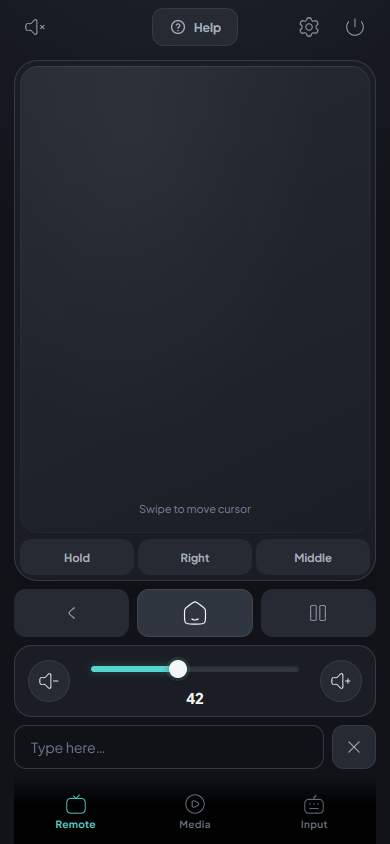
Navigate, type and adjust PC volume from the sofa without finding the keyboard.
Move, click, right-click, scroll and drag windows.
Pair multiple phones to one PC, each with its own controller.
Advance PowerPoint slides while the slideshow is focused on the PC.
LocalTV Remote is open source and runs on your local network. It does not require an account or cloud relay.
Install LocalTV Remote on your Windows PC — it's the only device that needs anything installed. Scan the QR code with your phone's camera and your browser opens a trackpad, keyboard and volume remote. Nothing to install on the phone, no app store, no account.
Yes. Several phones can pair independently with one PC. They share the same Windows cursor and active application. Use a trusted local network: controller traffic uses unencrypted HTTP and WebSocket.
LocalTV Remote is free, Apache-2.0 open-source, needs no companion app on the phone, and has no paid tier. It runs LAN-only with no cloud relay or account.
Windows 10 and Windows 11 (64-bit). Install the Windows app on the PC; use an iPhone or Android browser as the controller.
LocalTV Remote sends ordinary Windows input to the active application. Elevated applications and some games may reject injected input; compatibility depends on the application.
No. It is LAN-only: input stays on your local Wi-Fi with no cloud relay and no account. Pairing uses a 6-digit PIN, and connections are origin-checked and rate-limited.
No. After the first scan your phone remembers a trusted token and reconnects automatically the next time.
Not yet — Windows 10 and 11 only today. The input layer is abstracted behind a backend interface, so macOS and Linux support is open to contributors.